Facebook & Instagram LERS Portal: Police Data Request Guide
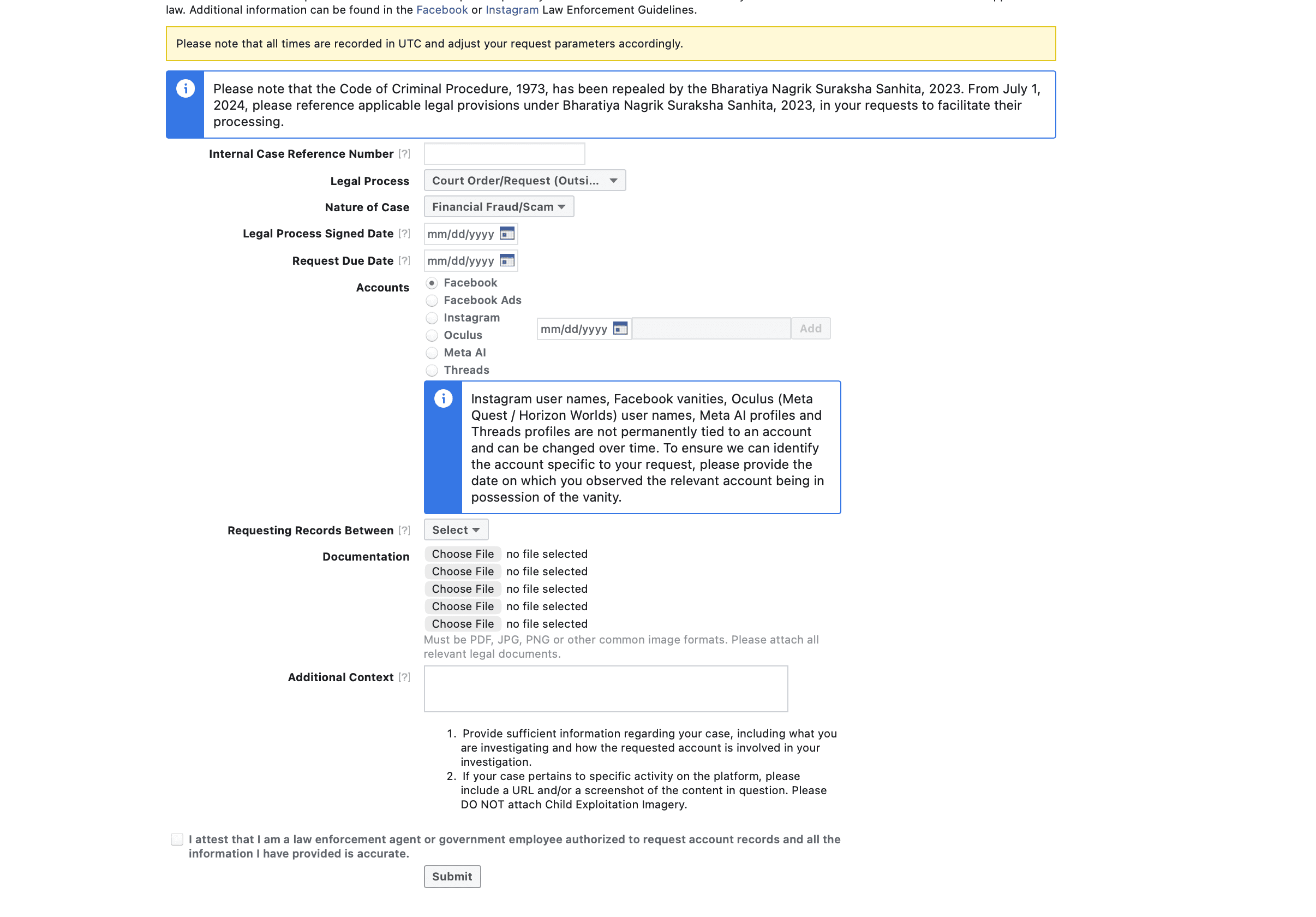
How police request Facebook, Instagram and Threads data via Meta's LERS portal at facebook.com/records: preservation, records requests, and emergencies.
Facebook, Instagram, Threads, and Meta advertisement investigations for law enforcement run through Meta’s LERS Portal (Law Enforcement Response System). This is a step-by-step guide for authorised police and government officials to submit preservation requests and records requests across Meta’s products.
- Portal: facebook.com/records/login (the Meta / Facebook LERS Portal)
- Who can use it: authorised law-enforcement / government officials, with an official government email (Gmail/Outlook rejected)
- Covers: Facebook, Instagram, Threads, Facebook Ads, Oculus, Meta AI
- Address legal notices to: Meta Platforms, Inc. — the actual data custodian
Can’t sign in to Meta’s law-enforcement portal?
- The portal is at facebook.com/records/login. Access needs a government-issued email address: tick the attestation and click “Request Access”. Meta doesn’t publish how long verification takes or any password-reset steps.
- Reporting a hacked account or asking for content review? That is a different portal (officialrequests.meta.com), only for agencies Meta has already onboarded. Records and preservation requests stay on facebook.com/records.
- Meta publishes no portal support email. Requests can be posted to Meta Platforms, Inc., 1 Meta Way, Menlo Park, CA 94025, US, but Meta says those take longer.
1Access the portal
- Go to facebook.com/records/login.
- Tick “I am an authorized law enforcement agent or government employee…” and click Submit.
- Enter your official government email ID — private accounts (Gmail, Outlook) are rejected.
- An email from [email protected] arrives (check spam too). The link is valid for 1 hour, so click it promptly.
2Make a Preservation Request (no signed notice required)
Open Make a Preservation Request, enter the case number, and select the Meta product and date range to preserve. Products available: Facebook, Facebook Ads, Instagram, Oculus, Meta AI, Threads. No signed or stamped notice is needed to start a preservation.
3Make a Records Request
Open Make a Record Request to seek metadata for a profile or account, then categorise the linked crime. Meta’s options include: bullying/harassment, child safety, criminal defamation, drugs, fake/impersonation, financial fraud/scam, firearms, fugitive, gang activity, hacked account, hate speech, homicide, human smuggling/trafficking, missing/kidnapped person, physical assault, robbery/theft, sex crime, sexual extortion, suicide, terrorist activity, threats of violence, and others.
4Attach legal documentation & submit
Attach a signed and stamped notice addressed to “Meta Platforms, Inc.” stating the offence, the legal section, and the identifier (e.g. the Facebook profile link). Any lapse can get the notice rejected. In India, cite IT Rules 3(1)(j) and the 72-hour timeline, and select the date of the offence for accurate records. Finally, tick the attestation checkbox and submit; a confirmation email follows.
Frequently asked questions
What is the Facebook / Meta LERS Portal?
LERS (Law Enforcement Response System) is Meta’s official portal at facebook.com/records where authorised officials request data for Facebook, Instagram, Threads and other Meta products.
Who is the legal data custodian?
Meta Platforms, Inc. — all legal notices must be addressed to it.
Do I need a court order to preserve an account?
No. A preservation request needs no signed notice; a records request requires valid legal process.
See also
- Overview: law-enforcement data-request portals across all platforms
- WhatsApp LERS Portal: police & government data request guide
- Telegram law-enforcement data request: how to investigate Telegram
For the full directory of platform law-enforcement request portals, see our LERS portal hub.
Once you receive a records response from Meta, our free Facebook LERS Data Analyzer can turn that PDF or HTML export into an investigation-ready report — a login timeline with IP location and provider, impossible-travel and datacenter/VPN checks, and recommended next steps. It is part of our Forensic Tools.