Threat analysis: Google Sites phishing that fools password managers via sites.google.com
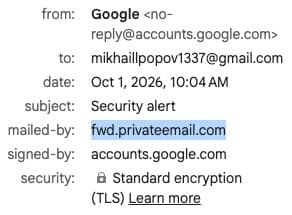
Threat analysis of a Google Sites phishing kit reported by @VincentBounce: spoofed Google ‘app password / security alert’ mail, landing on sites.google.com/view/delete-new-app with CAPTCHA theatre, credential forms that trigger password-manager autofill, and mailed-by fwd.privateemail.com instead of Google bounce hosts. Includes IOCs and defender checklist.
Threat analysis: Google Sites phishing that fools password managers via sites.google.com
A public incident report from researcher Vincent Bounce (@VincentBounce, 1 October 2026) documents a high-quality Google-themed phishing chain that abuses legitimate Google Sites hosting, spoofed “Security alert / App password created” email framing, a CAPTCHA interstitial, and password-manager autofill conditioned on the trusted sites.google.com apex. The lure claimed third-party access had been created for an unknown Gmail user and pushed victims toward a credential harvest hosted under google.com infrastructure, not a lookalike domain.
This analysis treats the thread as an open-source incident report. Indicators below are for detection and awareness; do not visit live phishing paths from production browsers.
Attack narrative (observed)
1. Delivery: Victim receives a Gmail-looking “Security alert” stating an app password was created / third-party access was generated for an unknown @gmail user. Display From: Google <[email protected]>. Gmail UI may show no obvious phishing banner.
2. Primary CTA: Link points to https://sites.google.com/view/delete-new-app (also observed with ?pli=1&authuser=0). A secondary legitimate-looking link to https://myaccount.google.com/notifications may appear to reinforce trust.
3. Credibility theatre: Landing page presents as google.com “Performing security verification” with a reCAPTCHA / “I’m not a robot” challenge (Ray ID visible in screenshots), mimicking bot checks used on real Google properties.
4. Credential capture: After the check, a Google-styled “Sign in with your Google Account” form is served on sites.google.com, not a redirect to accounts.google.com.
5. Password-manager assist: Because the victim has (or had) a legitimate sites.google.com / Google Sites credential saved, managers such as 1Password offer autofill on the phishing page. That is the critical UX failure: same-registrable-domain trust for a content-hosting product colliding with an authentication UX that should only live on accounts.google.com.
6. Suspected next step: Thread replies note 2FA / passkey challenges may follow; reporter stopped before submitting credentials. A later screenshot shows a “Verifying it’s you… Complete sign-in using your passkey” style prompt, treat as part of the social-engineering continuum even if not fully completed in the report.
Why this is dangerous
- Trust inheritance: Hosting on sites.google.com puts the phishing page on a real Google TLS certificate and a google.com-owned hostname users are trained to trust.
- Autofill collision: Password managers that match on sites.google.com (or broad google.com rules) will happily fill Google credentials into an attacker-controlled Sites page.
- Mail authenticity theatre: Display From and signed-by can look Google-adjacent while mailed-by reveals third-party relay infrastructure.
- Low friction for “Mrs. Smith”: Subtle CTA layout differences (plain link vs Google’s large blue button) and mailed-by hostnames are weak signals for non-experts.
Key indicators of compromise (IOCs)
| Indicator | Role |
|---|---|
| sites.google.com/view/delete-new-app | Phishing / credential-harvest path |
| sites.google.com/view/delete-new-app?pli=1&authuser=0 | Same path with Sites query params |
| fwd.privateemail.com | Suspect mailed-by infrastructure (vs Google bounces) |
| Display From [email protected] with mailed-by fwd.privateemail.com | Spoofed Google security alert pattern |
| identity-reachout.bounces.google.com / gaia.bounces.google.com | Legitimate Google mailed-by examples (for contrast) |
Detection tip: In mail gateways and SOC playbooks, correlate Google-branded security alerts where mailed-by is not in Google’s known bounce/mailer set AND any click landing on sites.google.com/view/* authentication-looking pages.
Defender / user checklist
- Never enter Google account passwords on sites.google.com. Legitimate re-auth and OAuth live on accounts.google.com (and related Google identity endpoints), not Sites pages.
- Before acting on “app password / third-party access” alerts, open myaccount.google.com/security from a bookmark or typed URL, do not use in-mail links.
- Inspect Gmail “Show original” / message details: mailed-by and signed-by. Treat fwd.privateemail.com (and similar third-party relays) as high risk for Google-branded security mail.
- Password-manager hygiene: Prefer exact-domain matching for accounts.google.com; avoid saving primary Google passwords against sites.google.com; disable autofill on untrusted Google Sites paths.
- Assume CAPTCHA on a Sites URL is theatrical, not proof of authenticity.
- If credentials were entered: revoke sessions, change password from a known-good device, review third-party access and app passwords, enable / verify 2FA or passkeys, and report to Google phishing reporting channels.
Threat-analyst assessment
This is not novel malware. It is high-quality abuse of platform trust: Google Sites as a free, cert-valid phishing host + email spoofing that survives casual visual inspection + password-manager same-site autofill. Severity for credential compromise is high if the victim completes the flow; detection depends on mailed-by scrutiny and a hard rule that Google login never happens on Sites.
Organizations should add Sites-hosted Google lookalike login pages to URL filtering and user training, and treat “app password created” lure kits as an active theme.
Written by: Cyber Security Team, Ministry of Cyber Affairs
Source: @VincentBounce public thread, 1–2 October 2026 (https://x.com/VincentBounce/status/2105597638036881669)