Uber Law Enforcement Portal (LERT): Police & Government Data Request Guide

How authorised police and government officials request data from Uber: the Law Enforcement Request Tool (LERT) at lert.uber.com — request types, the safety review, what to submit step by step, and how India's I4C Sahyog Portal fits in.
Uber handles law-enforcement and government data requests through its Law Enforcement Request Tool (LERT) at lert.uber.com — Uber's equivalent of other platforms' LERS portals. This is a step-by-step guide for authorised police and government officials; see also our explainer on what LERS is and the platform-by-platform LERS guide.
- Portal: lert.uber.com (Uber's Law Enforcement Request Tool, "LERT").
- Who can use it: authorised law-enforcement and government officials, with valid legal process.
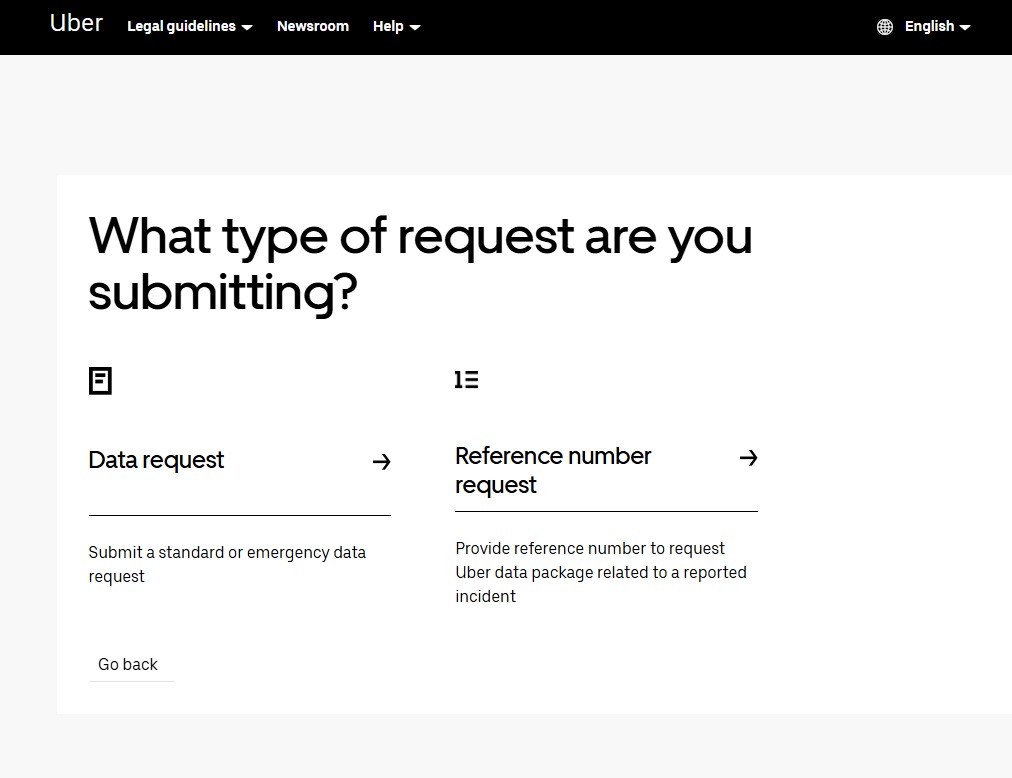
- Two request types: a Data request (standard or emergency) or a Reference number request (to obtain an Uber data package tied to a reported incident).
- India: investigators can also raise requests via the I4C Sahyog Portal — see the India section below.
Choose your request type
On the portal, you first choose between a Data request (submit a standard or emergency data request) and a Reference number request (provide a reference number to request an Uber data package related to a reported incident).
Acknowledge the safety review
Every request is subject to a safety review. Uber asks you to describe the allegations you are investigating and how the data subject may be involved, then reviews whether any identified individuals may present a safety risk to other users. Individuals identified may face temporary or permanent loss of access to the Uber app.

What you'll need
- Agency Case Number (required) — your case reference.
- The correct Product Line — Rideshare, Delivery, Bikes/Scooters/Mopeds, Trains/Buses/Boats, Car Rental/Carshare, Freight (US & Canada only), or Other. Selecting the most accurate line expedites Uber's response.
- The date range of records you need (beginning and ending).
- The incident date and time in your local time zone.
- Your legal process document to upload (subpoena, court order, warrant — or an emergency request).
- Optional but helpful: vehicle details (make, model, licence plate, colour, VIN).

How to submit a request
- Go to lert.uber.com and choose Data request or Reference number request.
- Acknowledge the safety-review notice ("I understand") and continue.
- Complete the Emergency Assessment — select Yes only if the matter involves imminent danger of death or serious physical injury (this triggers the expedited path); otherwise No. Then upload your legal process under Legal Process Information.
- Enter the request details — Agency Case Number, Product Line, and the records date range.
- Describe the incident — date and time, whether an Uber user is confirmed as a suspect (rider/recipient or driver/courier) or is a person of interest/witness/victim, whether a minor is involved, and whether the incident occurred between two parties connected via the Uber app.
- (Optional) Add vehicle details to help Uber identify the trip and account.
- Submit, and track the request via its reference number.


India: the I4C Sahyog Portal
In India, investigators can raise data requests to intermediaries through the Sahyog Portal operated by the Indian Cyber Crime Coordination Centre (I4C), under the Ministry of Home Affairs, under Section 94 of the Bharatiya Nagarik Suraksha Sanhita (BNSS) and Section 79(3)(b) of the Information Technology Act. Sahyog provides a single, accountable channel for Indian law-enforcement agencies to request data and cooperation from digital platforms during active investigations. Victims should still file first at cybercrime.gov.in or call 1930; the platform request is raised by the investigating officer.
Frequently asked questions
Where do police request Uber data? Through Uber's Law Enforcement Request Tool at lert.uber.com; in India, also via the I4C Sahyog Portal.
What's the emergency path? In the Emergency Assessment, flag the matter as imminent danger of death or serious physical injury for expedited handling.
What speeds up a request? The correct Product Line, a clear Agency Case Number, a precise date range, and any trip/vehicle details.
Can a user lose app access? Yes — Uber may temporarily or permanently restrict accounts flagged during its safety review.
For other platforms, see our full LERS portal hub.
Sources
- Uber — Law Enforcement Request Tool (LERT)
- I4C Sahyog Portal (Ministry of Home Affairs)
- Indian Cyber Crime Coordination Centre (I4C) — National Cyber Crime Reporting Portal
See also: Uber Preservation and Emergency Requests: Police Guide and Template.